
Castle Clash Retro Strategy Game
Reviews
Castle Clash Retro Strategy Game offers a nostalgic pixel art style and engaging two-player local battles. The brick building and catapult mechanics add strategic depth, while bonus drops keep matches dynamic. It is easy to learn but offers enough challenge for repeated play.
About this game
Game Introduction
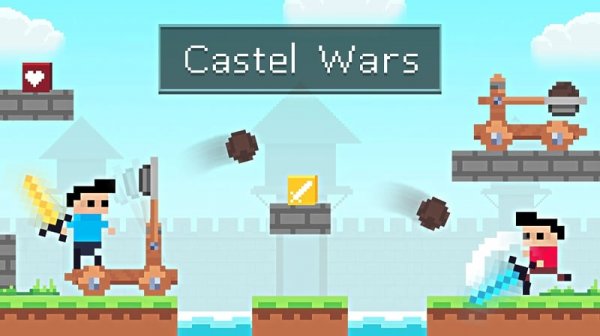
Castle Clash Retro Strategy Game is a two-player medieval strategy game with a retro-pixel art style. Players take on roles in a castle-themed arena where quick thinking and clever moves are essential. The core objective is to outmaneuver your opponent by building small brick barriers to block their path, escape from tight spots, or trap them. A variety of tools and a powerful catapult located in each player's tower provide strategic advantages. A mysterious hero flies overhead with balloons, occasionally dropping bonuses such as new items and projectiles. If a player becomes stuck, they can press an action button to throw a special item to break free. Developed by RHM Interactive, this game offers endless fun directly in your web browser.
How to Play
In Castle Clash Retro Strategy Game, two players compete on the same device. The blue player uses keyboard keys to move, jump, attack, and place blocks. The red player uses arrow keys and other keys for the same actions. Players build bricks strategically to block their opponent or create escape routes. The catapult in each tower can be used for powerful attacks. Players collect bonuses dropped by the flying hero to gain new tools and projectiles. When cornered, the action button allows a player to throw a special item to change the situation. The game emphasizes timing and spatial awareness.
Game Features
Retro-pixel graphics create a nostalgic visual style. The game supports two-player local battles on a single device. Players can build bricks to create barriers and escape routes. Catapult mechanics allow for powerful attacks from the tower. Bonus drops from a flying hero provide new items and projectiles. A special item can be used to break free when stuck.
Tips for Success
Practice moving and jumping to navigate the arena quickly. Use bricks to block enemy attacks or create escape routes. Keep an eye on the flying hero for bonus drops that can give you an edge. Master the catapult timing for powerful strikes. If you get cornered, use the special item to break free and turn the tables.





Comments
0 comments